- 0、学前准备
- 0.0 APP.module.ts配置
- 1.0 TypeScript语言简介
- 2.0 如何在TypeScript中引入js包
- 3.0 pipes的使用
- 4.0 双向数据绑定
- 5.0 页面跳转
- 6.0 声明属性 绑定数据
- 7.0 请求数据
- 8.0 父子组件传值
- 9.0 ionic3 开发之工作原理(
- 1、环境配置
- 1.1 开发环境搭建
- 1.2 VS Code软件语言
- 1.3 Git账号初始化
- 2、开始第一个App
- 2.0 使用Git进行版本控制
- 2.1 创建并运行App
- 2.2 修改应用图标启动界面包名
- 2.3 Ionic3新特性懒加载
- 2.4 使用懒加载改造现有页面
- 2.5 创建一个新的页面
- 2.6 Ionic3封装全局网络请求服务
- 2.7 上拉更新与下拉更新
- 2.8 常用开发技巧
- 2.9 UI设计
- 3.0 搜索页面设计与开发
- 3.1 安卓下硬件返回键的处理
- 3.2 tabs默认选中项
- 3.3 ionic3&echarts
- 3、插件使用
- 3.1 禁止App横屏
- 3.2 调用照相机拍照
- 3.3 拍照文件上传
- 3.4 图表报表chart.js
- 3.5 百度地图SDK秘钥申请
- 3.6 极光推送
- 3.7 扫描二维码
- 3.8 百度定位Android版插件
- 3.9 自己写的手机端即时聊天
- 3.10 极光推送
- 3.11 卸载插件
- 3.12 热更新
- 3.13 音频、视频播放
- 3.14 App在线升级
- 3.15 检查硬件权限
- 3.16 图片预览大图
- 4、App打包
- 4.1 使用Android studio打包
- 4.2 使用命令打包
- 4.3 Ionic3启动慢解决方法
- 4.4 解决同台手机兼容问题
- 4.5 创建打包用的key
- 5、常见错误
- 5.1 创建项目时常见错误
- 5.2 添加Android环境时常见错误
- 5.3 Without `from` option
- 5.4 ionic版本降级操作
- 5.5 多人同时打包失败的一次记录
- 5.6 百度地图定位出错问题
- 5.7 ionic3 iOS真机http请求失败
- 5.8 百度地图定位第一次失败
- 5.9 ionic3 打包报错[ERROR]
- 5.10 一直在欢迎页面进不去
- 5.11 升级bug
- 5.12 ionic3程序安装冲突
- 请求不能跨域
- 6、项目实战
- 6.0 界面样式
- 6.1 百度地图
搜索页面设计与开发
发布时间 2018-5-23 16:22:03
浏览量()
收藏(1)
代码格式化:Alt+Shift+F
搜索页面设计:

在首页或者列表页面的头部放一个搜索框代码如下:
<ion-header>
<ion-navbar>
<ion-searchbar (tap)="goSearch()"></ion-searchbar>
</ion-navbar>
</ion-header>
ts
//定义一个跳转到搜索页面的方法
goSearch(){

this.navCtrl.push(SearchPage);
}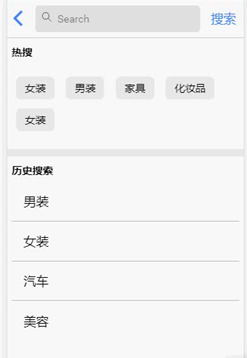
在搜索页面有:热搜、历史搜索、搜索列表
搜索的步骤:
1、点击搜索的时候触发一个方法,使用双向数据绑定获取搜索框里面的值
双向数据绑定:
后台定义:public keywords = '';  /*关键词*/
页面绑定:<ion-searchbar [(ngModel)]="keywords"></ion-searchbar>
2、根据接口获取数据
定义list:public list = [];  /*模拟获取到的数据*/
给list赋值:this.list = data.result;
取得数据之后将数据展示到界面,同时隐藏热词和历史搜索,显示数据列表
隐藏热词和历史搜索:
public flag = false;  /*有没有关键词、关键词开关*/
<div class="search_content" *ngIf="!flag">
</div>
3、上拉加载更多(分页)
页面中添加加载更多组件:
<ion-infinite-scroll (ionInfinite)="doLoadMore($event)">
<ion-infinite-scroll-content></ion-infinite-scroll-content>
</ion-infinite-scroll>
ts代码中的加载更多事件:
//加载更多
doLoadMore(infiniteScroll) {

this.getSearchList(infiniteScroll)

}
加载更多获取数据方法处理:
定义页码:
public page = 1; /*分页*/
逻辑处理
getSearchList(infiniteScroll) {

if (!infiniteScroll) {  /*点击搜索按钮*/
this.page = 1;
}

var api = 'api/plist?search=' + this.keywords + '&page=' + this.page;
this.httpService.requestData(api, (data) => {
console.log(data);

if (this.page == 1) {  /*第一页 替换数据 搜索一个关键词之后再接着搜另外一个关键词 不能让数据拼接了*/
this.list = data.result;

} else {
this.list = this.list.concat(data.result);  /*拼接数据*/
}
this.flag = true;  /*显示商品列表*/
if (infiniteScroll) {
//告诉ionic 请求数据完成
infiniteScroll.complete();
/*没有数据停止上拉更新*/

}
this.page++;

})

}
bug处理:
没有数据停止上拉更新:
首先定义个开关:
public hasData=true; /*是否有数据*/
我们定义的每页显示10条数据,如果当前页面小于:
             /*没有数据停止上拉更新*/
             if(data.result<10){
                this.hasData=false;
             }


   <ion-infinite-scroll (ionInfinite)="doLoadMore($event)" *ngIf="hasData">   /*页面中没有数据就销毁上拉组件*/
        <ion-infinite-scroll-content></ion-infinite-scroll-content>
      </ion-infinite-scroll>


       if(!infiniteScroll){  /*点击搜索按钮*/
        this.page=1;
        this.hasData=true; /*换个关键词第一次的时候*/

     }
搜索结果页面跳转到顶部:
使用官方组件:https://ionicframework.com/docs/api/components/content/Content/
 if(!infiniteScroll){  /*点击搜索按钮*/
        this.page=1;
        this.hasData=true;
        this.content.scrollToTop(0); /*回到顶部*/
     }
历史记录:
历史记录保存到自己手机上,localsorage
长按删除事件:
https://ionicframework.com/docs/components/#gestures
至此搜索完整功能就完成了,下面是完整代码:
<ion-header>

  <ion-navbar>
    <ion-searchbar [(ngModel)]="keywords"></ion-searchbar>

    <ion-buttons end>
      <button ion-button (tap)='getSearchList()'>
         搜索
      </button>
    </ion-buttons>
  </ion-navbar>

</ion-header>


<ion-content>


  <div class="search_content" *ngIf="!flag">

      <div class="hotlist">

              <h3 class="search_title">热搜</h3>

              <p>
                <span>女装</span>
                <span>男装</span>
                <span>家具</span>
                <span>化妆品</span>
                <span>女装</span>
              </p>

            </div>

            <div class="history" *ngIf="historyList.length>0">

                 <h3 class="search_title">历史搜索</h3>
                 <!-- 事件http://ionicframework.com/docs/components/#gestures -->
                 <ion-list inset >
                   <ion-item *ngFor="let item of historyList" (press)="removeHistory(item)" (tap)="goSearch(item)">
                      {{item}}
                   </ion-item>

                 </ion-list>

            </div>

  </div>


  <div class="list_content"  *ngIf="flag">

      <div class="sub_header">
          <div>综合</div>
          <div>销量</div>
          <div>价格</div>
      </div>

       <ion-list inset>
        <ion-item *ngFor="let item of list" >
          <ion-thumbnail item-left>
             <img [src]="config.apiUrl+item.s_pic"  />
          </ion-thumbnail>
          <h2> {{item.title}}</h2>
          <p>价格:<span class="price">{{item.price}}</span>元</p>
        </ion-item>
       </ion-list>


       <ion-infinite-scroll (ionInfinite)="doLoadMore($event)" *ngIf="hasData">
        <ion-infinite-scroll-content></ion-infinite-scroll-content>
      </ion-infinite-scroll>
  </div>

</ion-content>
ts
import { Component,ViewChild } from '@angular/core';
import { IonicPage, NavController, NavParams,Content,AlertController  } from 'ionic-angular';
import { ConfigProvider } from '../../providers/config/config';
import { HttpServicesProvider } from '../../providers/http-services/http-services';
import { StorageProvider } from '../../providers/storage/storage';

@IonicPage()
@Component({
  selector: 'page-search',
  templateUrl: 'search.html',
})
export class SearchPage {

  //装饰器    this.content.scrollToTop();回到顶部

  @ViewChild(Content) content: Content;

  public flag=false;  /*有没有关键词、关键词开关*/

  public keywords='';  /*关键词*/

  public list=[];  /*模拟商品数据*/

  public page=1; /*分页*/

  public hasData=true;  /*是否有数据*/

  public historyList=[]; /*历史记录的数据*/


  constructor(public navCtrl: NavController, public navParams: NavParams,public config:ConfigProvider,public httpService:HttpServicesProvider,public storage:StorageProvider,public alertCtrl: AlertController) {

    //获取历史记录
    this.getHistory();
  }

  ionViewDidLoad() {
    console.log('ionViewDidLoad SearchPage');
  }


  getSearchList(infiniteScroll){


     if(!infiniteScroll){  /*点击搜索按钮*/
        this.page=1;
        this.hasData=true;
        this.content.scrollToTop(0); /*回到顶部*/
        //调用保存历史记录的方法
        this.saveHistory();

     }

      // console.log(this.keywords);

      var api='api/plist?search='+this.keywords+'&page='+this.page;
      this.httpService.requestData(api,(data)=>{

          if(this.page==1){  /*第一页 替换数据*/
            this.list=data.result;
          }else{
            this.list=this.list.concat(data.result);  /*拼接数据*/
          }
          this.flag=true;  /*显示商品列表*/
          if(infiniteScroll){
            //告诉ionic 请求数据完成
            infiniteScroll.complete();
             /*没有数据停止上拉更新*/

             if(data.result<10){
                this.hasData=false;
             }


          }
          this.page++;

      })


  }

  //点击历史记录执行的方法

  goSearch(keywords){

    // console.log(keywords);
    this.keywords=keywords;

    this.getSearchList('');


  }

  //加载更多
  doLoadMore(infiniteScroll){

    this.getSearchList(infiniteScroll)

  }

  //保存历史记录

  saveHistory(){
    /*
      1.localStorage获取历史记录
    */

    var history=this.storage.get('historyData');

    //2.判断历史记录存在不存在
    if(history){ /*有*/
      // ['女装','手机','电脑','男装']
      if(history.indexOf(this.keywords)==-1){

        history.push(this.keywords);
        //重新写入
        this.storage.set('historyData',history);
      }


    }else{ /*以前没有*/

      this.historyList.push(this.keywords);
      // historyList: ['女装']

      //写入到localstorage

      this.storage.set('historyData',this.historyList);


    }

  }
  //获取历史记录

  getHistory(){

     var history=this.storage.get('historyData');
     if(history){  /*如果历史记录存在 把历史记录给数据*/
        this.historyList=history;
     }
  }
  //删除历史记录

  removeHistory(keywords){
    //提示
    let confirm = this.alertCtrl.create({
      title: '您确定要删除吗?',
      message: '您确定要删除这条历史记录吗,确定点击是,否则点击否。',
      buttons: [
        {
          text: '否',
          handler: () => {

          }
        },
        {
          text: '是',
          handler: () => {

              var index=this.historyList.indexOf(keywords);
              // console.log(index);

              this.historyList.splice(index,1);
              //写入到localstorage
              this.storage.set('historyData',this.historyList);
          }
        }
      ]
    });
    confirm.present();
  }

}
scss页面:
 /*热搜*/
  .search_title{

        font-size: 1.4rem;
        font-weight: bold;
        padding:.5rem 0px;
        margin:0px;
    }
    .hotlist{

        padding:.5rem;
    }
    .hotlist p{
        padding:1rem 0px;
    }

    .hotlist span{
        padding:.5rem 1rem;
        background: #eee;
        border-radius: .5rem;
        margin:.5rem;
        display: inline-block;
    }

    .history{
        border-top:10px solid #eee;
        padding:.5rem;
        font-size: 1.4rem;
    }


//列表

.sub_header{

    height: 4rem;
    line-height: 4rem;
    position: fixed;
    top:4.3rem;
    width: 100%;
    border-bottom:1px solid #eee;
    display: flex;
    z-index: 2;
    background: #fff;

    div{
        flex: 1;
        text-align: center;
    }
}

.list_content .list-ios[inset]{

    margin-top:4rem!important;
}
广告会让浏览体验不好,可这是网站的唯一收入,请点击下面的百度广告,支持老高的开源行动吧!